

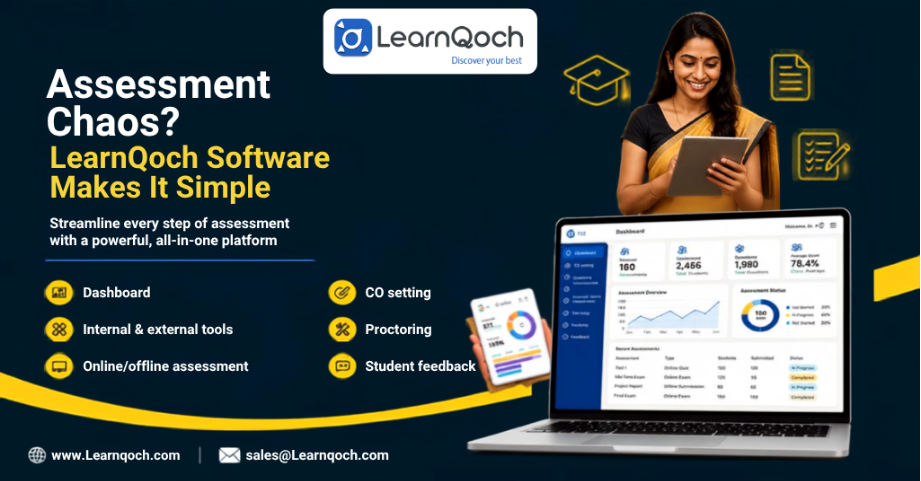
Assessment Chaos? LearnQoch Software Makes It Simple


Introduction
When assessment activities are managed through different Excel files, emails, documents, and disconnected systems, teachers and administrators can spend more time collecting, checking, and organizing data than analyzing student performance.
The challenge is not just conducting an examination or creating an online test. Institutions need to manage the complete assessment lifecycle—from CO mapping and question creation to evaluation, feedback, performance analysis, and reporting.
So, how can institutions manage all these assessment activities without juggling multiple files and systems?
This is where LearnQoch’s Assessment Management Software can help bring the entire process together on one platform.
The Everyday Assessment Problems
Teacher enters the classroom.
Students: “Good morning, Ma’am!”
Teacher: “Good morning, everyone! We have another class test in two days, so please make sure everyone is present and prepared.”
Student 1: “Ma’am, I was out of town during the last test. Can I take the paper today?”
Teacher: “I’ll have to ask the HOD first. Once I get approval, I’ll let you know.”
Student 2: “Ma’am, my marks for the last class test are still not updated.”
Teacher: “Okay, let me check. Come to my office tomorrow or during the break, and I’ll show you your paper.”
Student 3: “Ma’am, Sanjay was using unfair means during the exam, but last time you were angry only with me.”
Teacher: “I’ll have to check what happened and verify the assessment records first.”
Teacher: “Seriously, there are so many things to manage just for one class test—permissions, papers, marks, student queries, and complaints. It’s becoming so frustrating!”
“Honestly, this is frustrating for teachers in every school, college, and university. That’s exactly why we’re here—to help you reduce this workload and take the pain out of assessment management.”
To better understand
Talk with LearnQoch Experts!What You’ll Learn in This Blog?
- How Assessment Management Software simplifies the complete assessment lifecycle.
- How LearnQoch manages CO setting, question banks, internal/external, and online/offline assessments.
- How evaluation, proctoring, student feedback, and performance analysis can be managed digitally.
- How dashboards and reports help institutions turn assessment data into meaningful academic insights.
What Is Assessment Management Software?
Assessment Management Software is a digital solution that helps schools, colleges, and universities manage assessment activities from one platform.
Instead of maintaining separate Excel files, documents, and tools for different assessment tasks, faculty can manage questions, assessments, evaluation, student records, feedback, and reporting in a more organized way.
More importantly, it gives teachers and administrators better visibility into student performance, making it easier to identify learning gaps and take timely academic action.
In simple terms, it helps institutions reduce manual assessment work while making assessment data more useful for teaching, learning, and academic improvement.
Why Does Assessment Management Become Difficult?
As the number of students, courses, faculty members, and assessments increases, manual assessment management becomes more challenging.
A faculty member may create questions in one file, maintain marks in another Excel sheet, collect feedback separately, and later prepare reports manually. At the same time, administrators may need to consolidate information from multiple faculty members and departments.
This can result in:
- Scattered assessment data
- Repetitive Excel work
- Difficulty managing question banks
- Manual marks entry and evaluation
- Difficulty tracking CO-related assessment data
- Delayed report preparation
- Limited visibility into student performance
- Difficulty collecting and analyzing feedback
Consequently, an institution may have plenty of data but still struggle to get a clear picture of student performance.
How LearnQoch Simplifies Assessment Management?
Our Assessment Software connects assessment activities on one platform, helping teachers, administrators, and students manage the assessment process more systematically.
Instead of using separate tools for every activity, institutions can connect the journey from assessment planning to final reporting.
1. CO Setting & Mapping
Assessment becomes more meaningful when it is connected to what students are expected to learn.
Software helps institutions manage Course Outcome (CO) settings and mapping, allowing assessments to be aligned with relevant learning outcomes.
This helps faculty move beyond simply recording marks and understand how assessment contributes to measuring course outcomes.
2. Internal & External Assessment Management
Institutions conduct different academic activities as part of internal and external evaluation, such as:
- Internal assessments
- External examinations
- Surprise tests
- Assignments and class tests
- Practical assessments
- Industrial visit records
- Other academic activities
With our software, these activities can be managed within a structured assessment workflow, making it easier for faculty and administrators to maintain records, track activities, and access assessment-related information whenever required.
3. Online & Offline Assessments
Every assessment does not have to be conducted online. Some exams may happen digitally, while others may still require a question paper and offline evaluation.
With our software, faculty can conduct online assessments and see in real time who is attending and who has submitted the assessment. For offline exams, they can also create and manage question papers through the same platform.
So, whether the assessment is online or offline, everything can be managed from one place.
4. Question Bank Management
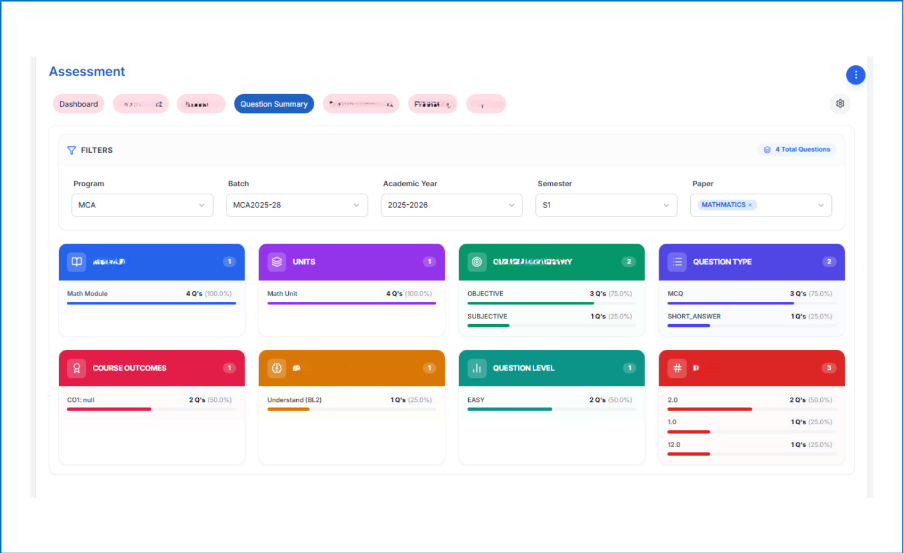
Creating questions for every assessment from scratch can take a lot of faculty time. With our software, faculty can create a question bank, categorize and summarize questions, and select questions based on their requirements.
Questions can be organized by:
- Course, unit, and topic
- Objective or subjective
- Easy, medium, or difficult
- CO and Bloom’s Level mapping
Faculty can also get a question summary before finalizing an assessment—for example, how many questions are objective or subjective, how many are mapped to COs, and how they are distributed across Bloom’s levels.
5. Proctoring for Online Assessments
Online assessments are convenient, but maintaining examination integrity is equally important. LearnQoch Proctoring helps monitor the assessment environment using real-time detection.
It can identify indicators such as:
- More than one face appearing during the assessment
- Mobile phones or other electronic devices
- Unusual or suspicious objects
- Unusual noise or sound
- Other potential examination-related irregularities
This gives faculty and administrators better visibility during online assessments and adds an additional layer of monitoring to help maintain examination discipline.
7. Student Performance & Feedback
Assessment should not end with publishing marks. The results should also help teachers review student performance and communicate it clearly to students.
With our software, teachers can share program-wise and student-specific performance information, such as internal examination results, assessment scores, and other academic performance details. The information can be presented in a clear result-card format, making it easier for students to understand their performance.
Teachers can also provide individual feedback or remarks based on the student’s performance.
8. Dashboards for Better Visibility
When assessment and assignment records are maintained across different files, it can be difficult to know the current status at a glance.
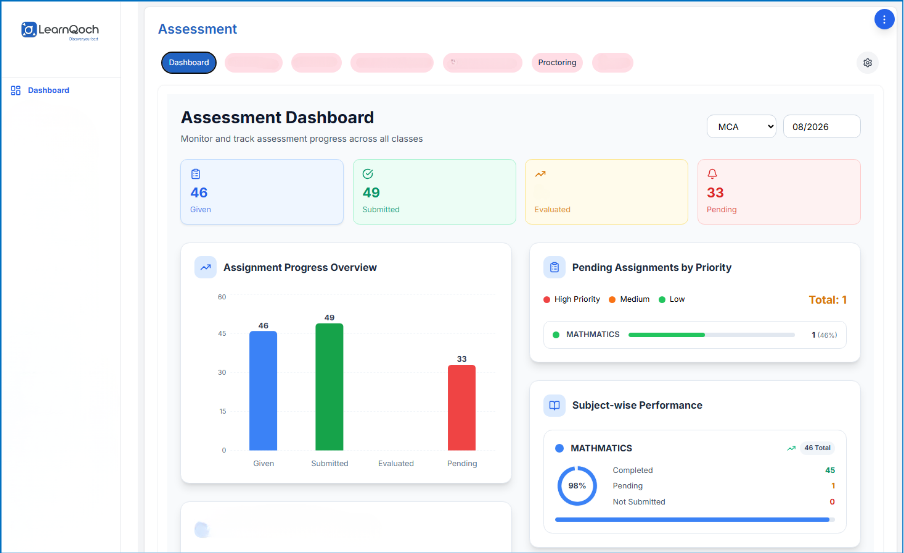
With our Assessment Dashboard, faculty and administrators can get a date-wise summary of assignments and assessments, including:
- How many assignments were conducted or given
- How many were submitted by students
- How many have been evaluated
- How many are still pending
This gives academic teams a quick view of assessment progress without manually checking multiple files or preparing separate status reports.
9. Reports for Academic Review
After assessments, faculty and administrators need quick and accurate reports for review and documentation.
Software generate reports such as:
- Assessment and question reports
- Student/person-wise reports
- Semester-wise reports
- Rubric reports
- Question-count reports
This makes it easier to review performance, identify gaps, and use assessment data for academic decisions—without manually preparing every report in Excel.
Make Assessment Management Simpler
Assessment involves many small activities—from preparing questions and conducting assessments to evaluation, feedback, and reporting. Managing each activity separately can make the process unnecessarily complicated.
A connected assessment system brings these activities together, helping faculty spend less time managing data and more time focusing on students and their learning.
And the benefit goes beyond day-to-day assessment. The same assessment data can also support accreditation documentation, helping institutions organize relevant records and evidence for NBA, NAAC, and other accreditation requirements.
So, by managing assessment data properly throughout the academic year, institutions can make both assessment management and accreditation preparation easier.
Conclusion
Assessment becomes difficult when every activity is managed separately. Institutions need more than just an online exam tool—they need a simple way to manage the entire assessment process, from CO setting and question creation to evaluation, feedback, performance analysis, and reporting.
With the LearnQoch Assessment Module, these activities come together on one platform, making it easier to manage assessment data, track student performance, and prepare reports.
The goal is simple: spend less time managing assessment data and more time understanding student performance and improving learning.
Beyond Assessment: Explore LearnQoch Academic Solutions

Manage the complete examination process—from exam scheduling, question paper creation, hall tickets, evaluation, marks, results, and reports—through one connected platform.
Simplify CO-PO-PSO mapping, attainment, assessment, and outcome analysis while connecting academic data to support continuous improvement and accreditation requirements.
- Timetable Management
Create and manage class timetables, faculty schedules, workload, and room allocation while reducing clashes and making academic planning easier.
Manage courses, learning materials, assignments, assessments, student activities, and performa place, helping faculty deliver and monitor learning more effectively. nce in one.
Ready to Simplify Your Assessment Process?
Move beyond scattered files and manual assessment work. With us, manage assessments, evaluation, performance, feedback, and reports on one platform.
Book Your Demo!Start your 14-Days Free Trial and see how we can simplify assessment management for your institution.
Have Questions or Want to Know More?
Talk to our experts to understand how the platform can fit your institution’s assessment and academic requirements.
📞 Call: 8451901079
📧 Email: sales@learnqoch.com
🌐 Website: www.learnqoch.com